Advanced networks
COM-407
Lab 4 In this lab, you will learn how to configure...
Description
Lab 4
In this lab, you will learn how to configure the OSPF routing protocol, which typically runs inside the network of an autonomous system (AS). The protocol automatically sets up network routes that ensure shortest path between two points in the network with respect to a predefined metric (such as number of hops). You will configure a fully functional network using “Cisco-like” emulated routers. You will learn how to configure a network of routers. Optionally (bonus exercise), you can learn about software-defined networking (SDN) and study how it can be used to create forwarding rules on switches. You are strongly advised to do this part as it gives you a good idea of how enterprise networks are managed today.
For this lab, you will be using the Mininet VM on the VDI platform.
The lab is meant to be done sequentially. Random access might give you different answers. We advise you to do a section in one sitting. Restarting Mininet or the Mininet VM within a section might make the analysis difficult.
FRRouting: Software Routing Suite
The Internet core is run by powerful routers that can handle large amounts of traffic and are built by companies such as Cisco, Huawei, or Juniper. Even in a large company, or in large university campuses (such as EPFL), these routers are present. They use proprietary operating systems (such as Cisco IOS, or JunOS) and can be accessed via control terminals tailored for network configuration, with commands that are quite different from those you may encounter in a UNIX/Linux console. In this lab and in lab 6, we will give you a flavour of router configuration.
Ideally, we would have liked to run Cisco IOS in a virtual environment. It is technically possible but not legal, as Cisco or Juniper do not allow their OSs to be run on a device other than their routers. Therefore, we will use FRR, a free software that implements and manages various IPv4 and IPv6 routing protocols. It accepts similar commands to the ones in Cisco’s IOS.
What is FRR and how does it work?
FRR is a routing software suite that provides implementations of several routing protocols (namely OSPF,
RIP, and BGP-4) for Unix platforms. The architecture of FRR is shown below
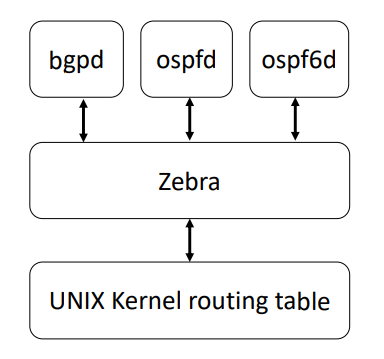
Figure 1: FRR Architecture
As depicted in the figure, it consists of a handful of processes that can be run in the background as daemons. Three FRR processes (daemons) are important for executing this lab:
- zebra: is used to manage the network interfaces of a machine (in our case, each router will run in the virtual machine). It allows you to configure them (using IPv4 and/or IPv6 addresses), to monitor their states, and it provides a more detailed view of the routing tables than the route -n command. In a way, zebra is a replacement for the Linux networking commands used during the first three labs (i.e., ifconfig, route, etc.).
- ospfd: handles OSPF version 2 implementation.
- ospf6d: handles OSPF routing for IPv6.
To fetch the required materials for this lab, open a terminal on your Mininet VM and run:
git clone https://github.com/nal-epfl/Advanced-Networking-Labs.git
All the scripts for this lab are located in the